Anki
What is Anki?
Anki is a free, open-source spaced-repetition flashcard app. You build a deck of notes; it schedules reviews so you see each card right as you are about to forget it.
Click Export on the main page to download your saved entries as a pipe-separated
(|) CSV. Each row becomes one Anki note.
Two-deck workflow
I keep Ukrainian cards across two decks: an intake deck
Ukrainian: New words and a mature deck
Ukrainian. Fresh exports land in intake. Once a card is stable - several clean reviews, no repeated stumbles - I move it across. This keeps review of the mature pile uninterrupted while I rate-limit how much new material lands on any given day.
Recommended, not mandatory. A single deck works too.
Quick start
The starter deck ships the Naholosy note type (3 fields, forward + backward cards), both decks, and a Naholosy deck preset with sibling-burying enabled - so once you answer the UA to EN card for a note, the EN to UA card is deferred to the next day. Card order within a note is UA to EN first.
-
Import the starter. In Anki: File -> Import -> pick
naholosy-starter.apkg. In the Import options panel, turn on Import any deck presets before clicking Import - Anki defaults it to off, and without it theNaholosypreset ships but never gets applied to the decks.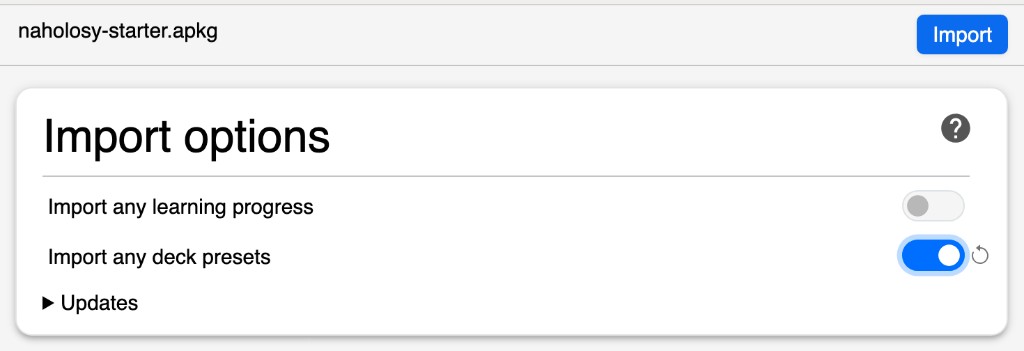
-
Clear the placeholders. Open Browse, search
tag:starter-placeholder, select all, and delete. They exist so Anki materialises both decks on import. -
Export your saved entries. Back on this site, click Export on the main page to download
saved-inflections.csv. -
Import the CSV. File -> Import -> the CSV. In the dialog:
- Type:
Naholosy - Deck:
Ukrainian: New words - Field separator:
Pipe - Allow HTML in fields: on
- Field mapping (set explicitly - Anki does not auto-map a column to Tags): column 1 -> Front, column 2 -> Back, column 3 -> Remarks, column 4 -> Tags (English), column 5 -> leave unmapped (Ukrainian tags).
- Type:
Column 5 is the Ukrainian-language tags. Swap with column 4 in the dialog if you prefer Ukrainian tags on your cards.
Export columns
| Col | Content | Maps to |
|---|---|---|
| 1 | Ukrainian word or phrase, stress marked in bold | Front |
| 2 | Hint + English summary (e.g. Adverb: secretly) |
Back |
| 3 | Dictionary form + Ukrainomicon glosses (HTML) | Remarks |
| 4 | Part of speech and grammar tags in English (space-separated, underscores for internal spaces, e.g. perfective_verb 1st_conjugation) |
Tags |
| 5 | Part of speech followed by grammar tags in Ukrainian (same shape) | unmapped by default |
Remarks preview
The Remarks field renders as HTML on the back of the card. Sample:
красти
Glosses
красти
to steal
Examples
Він вкрав гроші з каси.
He stole money from the till.
Moving cards to mature
Once a card in Ukrainian: New words feels stable, move it to
Ukrainian via Browse -> select -> right-click -> Change Deck. Batch as many as you like in one go.
Manual setup
Skip the starter and build it yourself:
-
Create the note type. Tools -> Manage Note Types -> Add -> "Add: Basic". Name it
Naholosy. Open Fields and set them, in order, toFront,Back,Remarks. -
Define two card templates. Open Cards for the note type and replace the defaults with:
Remarks travels with both directions; the nativeCard 1 - forwardFront: <p>{{Front}}</p> <p class="tags">{{Tags}}</p> Back: {{FrontSide}} <hr id=answer> <p>{{Back}}</p> <div class="remarks">{{Remarks}}</div>Card 2 - backwardFront: <p>{{Back}}</p> <p class="tags">{{Tags}}</p> Back: {{FrontSide}} <hr id=answer> <p>{{Front}}</p> <div class="remarks">{{Remarks}}</div>
{{Tags}}field renders on the card face. -
Create the decks.
Ukrainian: New wordsandUkrainian. In their deck options, turn on Bury new siblings and Bury review siblings so you never see forward and backward for the same note on the same day. - Import the CSV with the same dialog settings as the quick start above.
Card stylesheet
The starter deck ships this stylesheet. To reset it or apply it manually, open Cards
for the Naholosy note type, click
Styling, and paste:
.card {
  font-family: arial;
  font-size: 20px;
  text-align: center;
  color: black;
  background-color: white;
}

.tags {
  font-size: 0.8em;
  color: #888;
  margin-top: 0.5em;
}

.remarks {
  text-align: left;
}

.remarks p {
  margin: 0.4em 0;
  font-size: 0.9em;
}

.remarks-heading {
  font-weight: bold;
  font-size: 1.05em;
    padding-top: 0.6em;
}

/* Language prominence — to make Ukrainian primary, swap en and ua */
.gloss.en { color: black; }
.gloss.ua { color: #888; }